

Source: 
How one district decided on interactive tools to help each student.
 By Tim Dunn
Providing a consistent education-technology experience district-wide is important for students, teachers, administrators, and even parents. Prior to starting the process of standardizing new future-proof technologies, our district’s technology was not centrally purchased, which meant our classrooms were outfitted with a hodgepodge of presentation equipment. Some classrooms had old projectors, some had interactive whiteboards, and some classrooms had nothing at all.
We hoped to change this in 2010 when our district began lobbying for community support of a special bond referendum to use local tax dollars—called “special-purpose local-option sales tax” funds—to help fund our technology initiative. We informed our community about the outdated technology we had in place and explained how creating an interactive learning environment in each classroom would improve students’ learning. The community approved of our district using the sale tax funds to outfit each classroom with a new, universal presentation technology.
Weighing Advantages and Disadvantages of Technologies
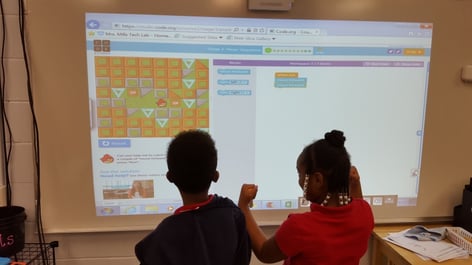
After getting approval from the community to use these funds, we needed to do our research to decide which presentation hardware would be the best to implement. We wanted the most advanced technology that was also future-proof, so we wouldn’t have to reinvest in technology again for several years. Fulton County Schools has approximately 6,100 classrooms, so we had to find a solution that was affordable. We knew we wanted to move away from the interactive whiteboards some classrooms had, so we looked at two options: flat-panel displays and interactive projectors. In the end, we chose the Epson BrightLink® 595Wi interactive projector because of its affordability, bright images, and its easy-to-use interactivity. As we made our decision we weighed the following factors.
Cost: When doing our research we found that interactive flat panels tended to cost much more than interactive projectors for the same viewing space. We also looked at non-interactive flat panels, but we felt it was important to have finger-touch interactivity to really allow students to interact with the projected contact.
Display Size: In order for all students in a classroom to easily see what is being projected, we required a large screen size, 100 inches, which interactive flat panels could not meet.
Installation: The weight of the equipment and ease of installation played a factor in our choice. An interactive projector weighs around 12 pounds, while an interactive flat panel is heavy enough to require two or three people to install. We also liked the ability to install an interactive projector over a white board, thus allowing the wall space to be used in multiple ways. The interactive projector we chose can also be installed on a table or cart allowing for a mobility. This is much more difficult to do with a heavy interactive flat panel.
Maintenance: Lastly, we found there were significant differences between the maintenance of a flat panel and an interactive projector. If a flat panel needs to be repaired or replaced, it has to be removed from the wall and shipped back to the manufacturer, which on its own is a labor-intensive process. And while the flat panel is being fixed, teachers are left without a way to present content. With an interactive projector, maintenance is limited to replacing the lamp. Lamps currently have a lamp life of up to 10,000 hours, which means that they will most likely need to be replaced only once in the lifetime of the projector. If the projector does need to be repaired or replaced, it’s very easy to take it off its mount and send it to the manufacturer. Also, it’s much less expensive and convenient to have a back-up interactive projector on hand for emergencies than it is to have a back-up flat panel. We chose Epson’s projector because of its Road Service Program, which will ship a new projector overnight free of charge when we need one repaired or replaced.
Making an Informed Decision
After our extensive research, we began installing a BrightLink 595Wi interactive projector in all of our classrooms. During Phase 1 of our implementation, we installed an interactive projector in 3,100 classrooms that lacked presentation equipment. Starting in November 2015, we moved on to Phase 2—replacing all existing equipment, called “legacy equipment,” with an interactive projector. This major implementation will be complete in August 2016. With its affordable price point, we were able to outfit all classrooms with the funds we had available.
The interactive projector has all of the previously listed advantages, but we were also impressed with its brightness and its compatibility with Promethean ActivInspire® and SMART Notebook®. I have always said the learning “magic” teachers create is in the software. Being able to give teachers the flexibility to use the software they already know along with a cutting-edge interactive projector was the ideal solution.
Tim Dunn is the director of IT program management in Fulton County Schools, Georgia.